On this page

 Setup guide · Tripleseat + Klaviyo
Getting started with Tripleseat
Learn how to integrate Tripleseat, a leading event and venue management platform, with Klaviyo. This integration allows you to automatically:
Looking for what the Tripleseat + Klaviyo integration does? See the overview →
You will learn
- Sync contact and lead profiles from Tripleseat into Klaviyo
- Fire Klaviyo events for every booking and event status change (prospect → tentative → confirmed → finished/lost)
- Fire Klaviyo events for lead lifecycle milestones (created, converted, turned down)
- Subscribe opted-in contacts to a Klaviyo email list
- Run a full historical backfill of all contacts, leads, and bookings on install
Before you begin
Tripleseat uses OAuth, so there are no API keys to request. You'll connect both Klaviyo and Tripleseat by clicking through their consent screens.
You'll need:
- A Tripleseat account with permission to grant OAuth consent (admin-level access is recommended)
- A Klaviyo account with permissions to authorize an OAuth app
Pricing: $39 per location per month.
Integrate Tripleseat with Klaviyo
1Connect your Klaviyo account
Click Connect Klaviyo. You'll be redirected to Klaviyo's OAuth consent screen — review the permissions and authorize the integration. You'll be returned to the install page, and Step 1 will show a Disconnect button confirming success.
2Connect your Tripleseat account
This step becomes active once Klaviyo is connected. Click Connect Tripleseat, log in, and authorize the integration on Tripleseat's OAuth consent screen. You'll be returned to the install page.
3Select your Tripleseat Locations
A table loads showing all locations from your Tripleseat account. All locations are auto-selected by default — check or uncheck rows to control which locations sync.
Note: Data only syncs from selected locations. Webhooks from unselected locations are silently ignored.
4Email consent list
Choose an existing Klaviyo list — or create a new one inline — to subscribe contacts and leads who have opted in to email in Tripleseat. Ensure the list is set to single opt-in, not double opt-in.
5Enter Payment Details
Click Connect to open Stripe Checkout. Subscription quantity equals the number of selected locations. After payment, you'll be redirected back to KAV Labs and shown your unique webhook URL for the next step.
6Configure your Tripleseat webhook
After payment, KAV Labs displays a unique webhook URL. Add it to Tripleseat so we receive real-time updates:
- In Tripleseat, go to Settings → Tripleseat API / Webhooks
- Click Add Webhook
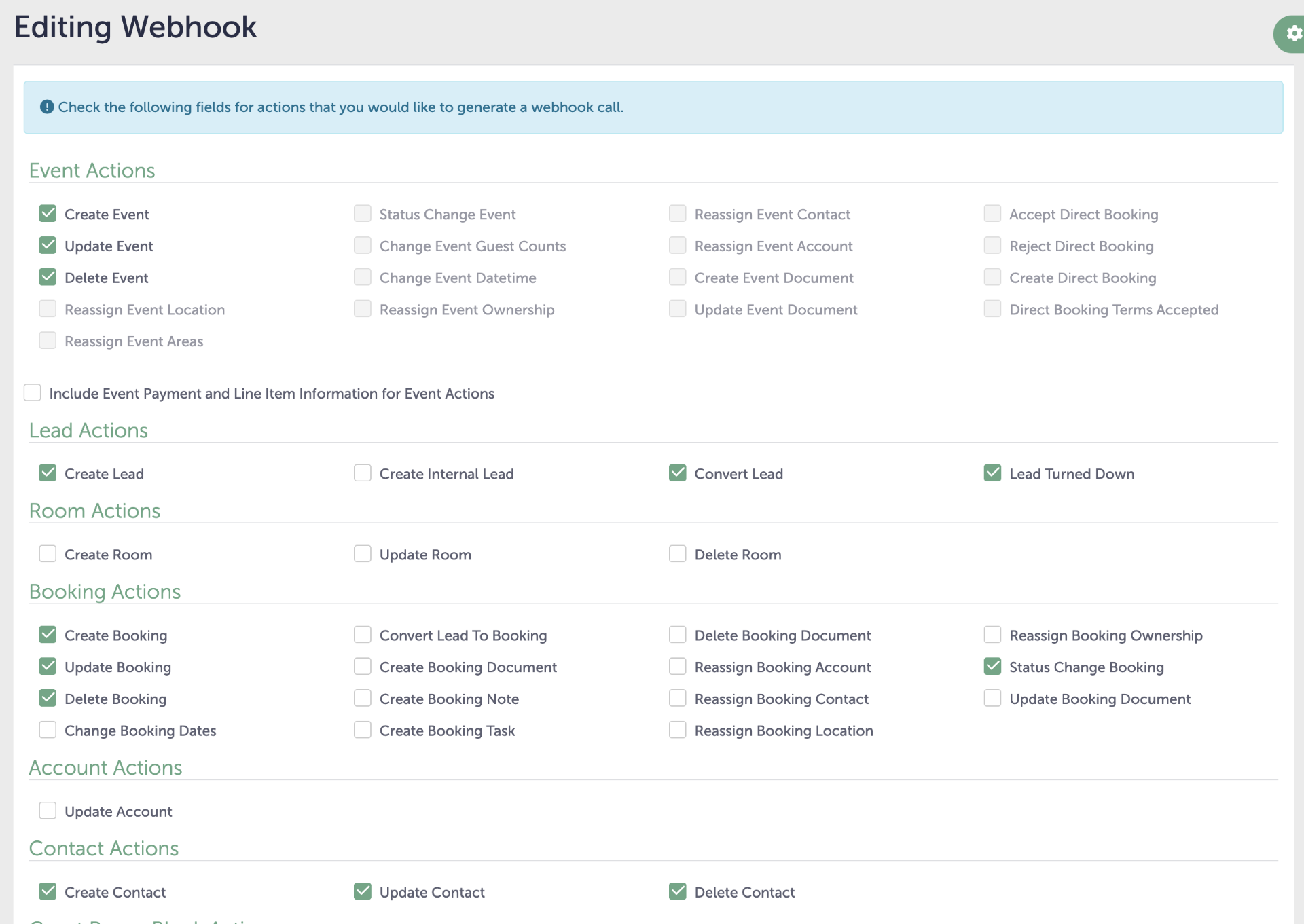
- Select the following actions:
- Event Actions: Create Event, Update Event, Delete Event
- Lead Actions: Create Lead, Convert Lead, Lead Turned Down
- Booking Actions: Create Booking, Update Booking, Delete Booking, Status Change Booking
- Contact Actions: Create Contact, Update Contact, Delete Contact
- Paste the webhook URL from KAV Labs into the URL field at the bottom of the page
- Click Create to save the webhook
Your webhook configuration should look like this:
Done!
You're all set! Here's what happens next:
- A historical backfill kicks off automatically, syncing all Contacts, then Leads, then Bookings — per location, sequentially
- From then on, webhooks deliver real-time updates — there is no polling cadence
- To verify, check Klaviyo Profiles for contacts/leads, and Klaviyo Metrics for events like Booking Prospect or Lead Created
Note: Tripleseat Events (the sub-records inside Bookings) are not included in the historical backfill — they sync going forward via webhooks only.
Looking for what the Tripleseat integration does? See the Tripleseat + Klaviyo integration overview →
FAQs
The historical sync is one-time on install. After that, all updates are webhook-driven and arrive in real time — there is no recurring polling interval.
Go to the Subscription tab, check the new location, and click Update Subscription. Stripe quantity updates automatically. Note: a historical backfill for the new location does not re-run — only the initial install triggers the backfill.
They are skipped entirely. If a contact or lead has no valid, parseable email address, neither a profile nor an event is created.
No — all records require a valid email address. Records with invalid or missing emails are dropped silently.
It's silently ignored — no profile upsert and no event are created.
No. Because contacts already opted in via Tripleseat, the historical-import flag is set when subscribing them, which bypasses the Klaviyo confirmation email.
Tripleseat does not expose a consent timestamp. We use a timestamp of 24 hours prior to the sync as a proxy, satisfying Klaviyo's requirement that consented_at be in the past.
No. Only Contacts, Leads, and Bookings are part of the historical backfill. Tripleseat Events (the sub-records inside Bookings) are synced in real time via webhooks only.
No. Tripleseat is an event management platform, not a POS — there are no catalog items, variants, or categories synced.
Webhook failures bubble up as exceptions and are logged and audited automatically. There is no in-app error view today — please contact support if you suspect an issue.
Tripleseat + Klaviyo: events & data reference
Overview
The Tripleseat integration syncs contact and lead profiles, plus booking, event, and lead lifecycle events, from Tripleseat to Klaviyo. After a one-time historical backfill, all updates are delivered in real time via webhooks.
New to the integration? Start with the Getting Started Guide.
Customer Profiles
Two types of Tripleseat records create Klaviyo profiles: Contacts and Leads. Profiles are upserted via Klaviyo's profile-import endpoint, with email address as the primary deduplication key. Records without an email are skipped.
Profiles from Contacts
Synced from your Tripleseat contacts in real time, plus a one-time historical backfill on install.
Standard Klaviyo Fields
| Property | Description |
|---|---|
| Contact's primary email address | |
| First Name | Contact's first name |
| Last Name | Contact's last name |
| Phone Number | Contact's primary phone |
| Location | Address details: street, city, region, country, and zip code |
Custom Properties
| Property | Description |
|---|---|
| Tripleseat Contact Id | Unique contact ID in Tripleseat |
| Tripleseat Account Id | ID of the account this contact belongs to |
| Tripleseat Account Name | Name of the account this contact belongs to |
| Tripleseat Customer Id | Tripleseat tenant/customer ID |
| Tripleseat Site Id | ID of the Tripleseat site |
| Tripleseat Contact Type | Contact type classification in Tripleseat |
| Tripleseat Email Opt In | Whether the contact opted into email in Tripleseat |
| Tripleseat Title | Contact's job title |
| Tripleseat Owned By User Id | ID of the Tripleseat user who owns this contact |
| Tripleseat Event Type | Type of event the contact is associated with — only set when the contact is updated from an event webhook |
Profiles from Leads
Synced whenever a lead is created, converted, or imported during the historical backfill.
Standard Klaviyo Fields
| Property | Description |
|---|---|
| Lead's email address | |
| First Name | Lead's first name |
| Last Name | Lead's last name |
| Phone Number | Lead's phone number |
| Organization | Company the lead is associated with |
Custom Properties
| Property | Description |
|---|---|
| Tripleseat Lead Id | Unique lead ID in Tripleseat |
| Tripleseat Lead Status | Lifecycle status: Not Converted, Converted, or Turned Down |
| Tripleseat Lead Event Style | Style of event the lead is inquiring about (e.g., catering) |
| Tripleseat Lead Location Name | Name of the Tripleseat location associated with the lead |
| Tripleseat Lead Site Id | ID of the Tripleseat site |
Booking Events
A separate Klaviyo event is fired every time a booking changes status, so you can trigger flows at any point in the lifecycle. Bookings without a contact email are skipped.
Events synced
- Booking Prospect
- Booking Tentative
- Booking Confirmed
- Booking Finished
- Booking Lost
Event Properties
| Property | Description |
|---|---|
| Booking Id | Unique booking ID in Tripleseat |
| Booking Name | Display name of the booking |
| Booking Status | Current Tripleseat status (e.g., Prospect, Definite) |
| Start Date | Booking start date |
| End Date | Booking end date |
| Total Amount | Grand total for the booking — also used as the event value |
| Location Name | Tripleseat location associated with the booking |
| Account Name | Account associated with the booking |
Tripleseat Event Events
Tripleseat Events are the individual events nested inside a booking. A separate Klaviyo event fires for each status change, in real time. These are not included in the historical backfill.
Events synced
- Event Prospect
- Event Tentative
- Event Definite
- Event Finished
- Event Lost
- Event Waitlist
Event Properties
| Property | Description |
|---|---|
| Event Id | Unique event ID in Tripleseat |
| Event Name | Display name of the event |
| Event Status | Current Tripleseat status |
| Event Date | Date the event takes place |
| Event Type | Category of event (e.g., Birthday, Corporate Bar) |
| Guest Count | Number of expected guests |
| Total Amount | Grand total for the event — also used as the event value |
| Booking Id | ID of the parent booking |
| Location Name | Tripleseat location where the event takes place |
Lead Events
A Klaviyo event fires at each lead lifecycle milestone, in real time and during the historical backfill. Leads without an email are skipped.
Events synced
- Lead Created
- Lead Converted
- Lead Turned Down
Event Properties (shared across all lead events)
| Property | Description |
|---|---|
| Lead Id | Unique lead ID in Tripleseat |
| Company | Company the lead is associated with |
| Event Description | Free-text description of the event the lead is inquiring about |
| Location Name | Tripleseat location associated with the lead |
| Created At | Original creation timestamp of the lead |
Sync Frequency
| Data Type | Mechanism | Frequency |
|---|---|---|
| Contacts | Historic + webhooks | One-time backfill, then real-time |
| Leads | Historic + webhooks | One-time backfill, then real-time |
| Bookings | Historic + webhooks | One-time backfill, then real-time |
| Tripleseat Events (sub-records) | Webhooks only | Real-time; not backfilled |
On first install: a full historical backfill runs through all pages of Contacts, then Leads, then Bookings — per location, sequentially. There is no date cut-off.
Ready to connect Tripleseat and Klaviyo?
Get started in minutes with a 30-day free trial. $39/mo per location.
Start your 30-day free trial