Table of contents
Getting started with Tripleseat
Looking for what the Tripleseat integration does? See the Tripleseat + Klaviyo integration overview →
You will learn
Learn how to integrate Tripleseat, a leading event and venue management platform, with Klaviyo. This integration allows you to automatically:
- Sync contact and lead profiles from Tripleseat into Klaviyo
- Fire Klaviyo events for every booking and event status change (prospect → tentative → confirmed → finished/lost)
- Fire Klaviyo events for lead lifecycle milestones (created, converted, turned down)
- Subscribe opted-in contacts to a Klaviyo email list
- Run a full historical backfill of all contacts, leads, and bookings on install
Before you begin
Tripleseat uses OAuth, so there are no API keys to request. You'll connect both Klaviyo and Tripleseat by clicking through their consent screens.
You'll need:
- A Tripleseat account with permission to grant OAuth consent (admin-level access is recommended)
- A Klaviyo account with permissions to authorize an OAuth app
Pricing: $39 per location per month.
Integrate Tripleseat with Klaviyo
1Connect your Klaviyo account
Click Connect Klaviyo. You'll be redirected to Klaviyo's OAuth consent screen — review the permissions and authorize the integration. You'll be returned to the install page, and Step 1 will show a Disconnect button confirming success.
2Connect your Tripleseat account
This step becomes active once Klaviyo is connected. Click Connect Tripleseat, log in, and authorize the integration on Tripleseat's OAuth consent screen. You'll be returned to the install page.
3Select your Tripleseat Locations
A table loads showing all locations from your Tripleseat account. All locations are auto-selected by default — check or uncheck rows to control which locations sync.
Note: Data only syncs from selected locations. Webhooks from unselected locations are silently ignored.
4Email consent list
Choose an existing Klaviyo list — or create a new one inline — to subscribe contacts and leads who have opted in to email in Tripleseat. Ensure the list is set to single opt-in, not double opt-in.
5Enter Payment Details
Click Connect to open Stripe Checkout. Subscription quantity equals the number of selected locations. After payment, you'll be redirected back to KAV Labs and shown your unique webhook URL for the next step.
6Configure your Tripleseat webhook
After payment, KAV Labs displays a unique webhook URL. Add it to Tripleseat so we receive real-time updates:
- In Tripleseat, go to Settings → Tripleseat API / Webhooks
- Click Add Webhook
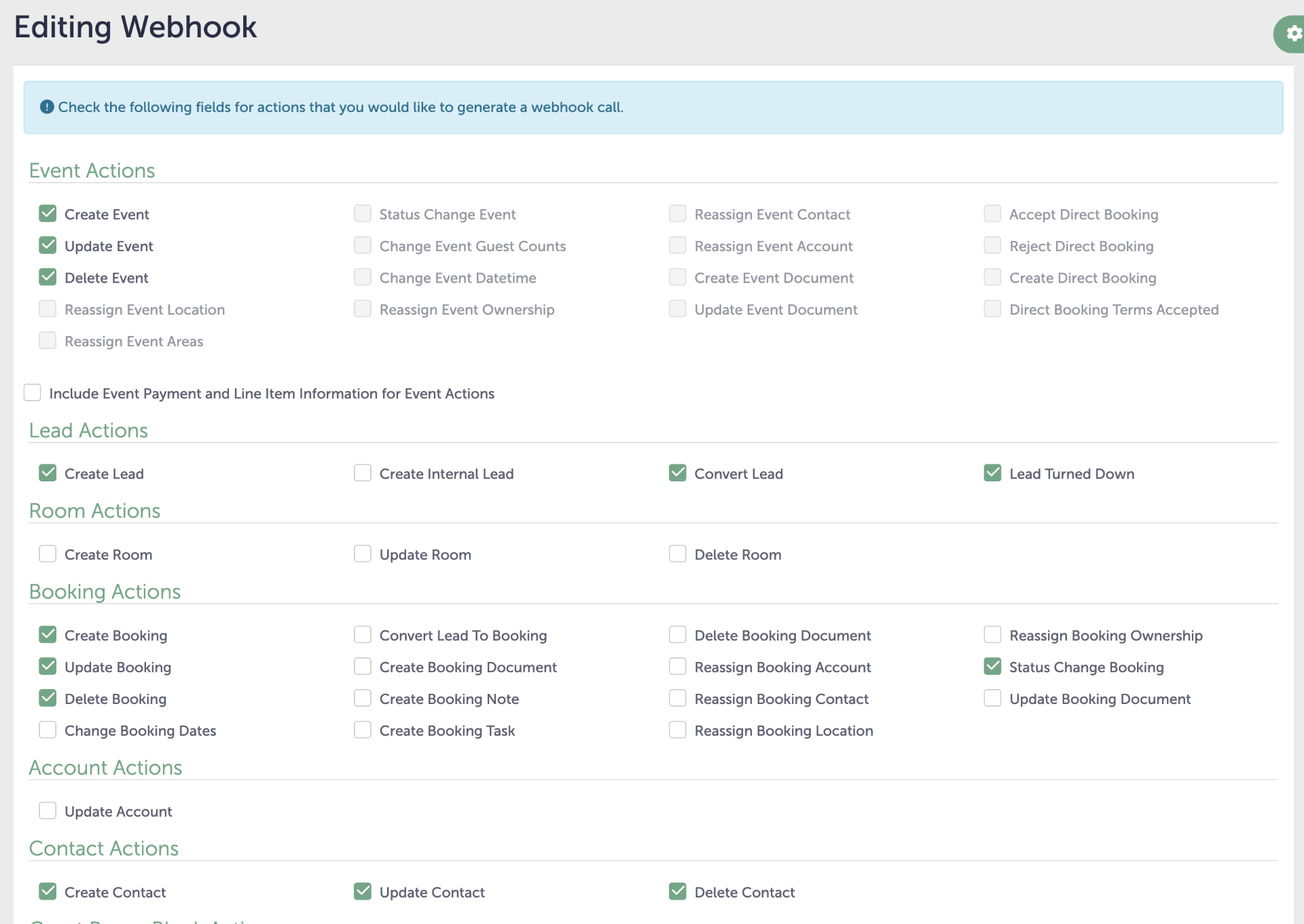
- Select the following actions:
- Event Actions: Create Event, Update Event, Delete Event
- Lead Actions: Create Lead, Convert Lead, Lead Turned Down
- Booking Actions: Create Booking, Update Booking, Delete Booking, Status Change Booking
- Contact Actions: Create Contact, Update Contact, Delete Contact
- Paste the webhook URL from KAV Labs into the URL field at the bottom of the page
- Click Create to save the webhook
Your webhook configuration should look like this:
✓Done!
You're all set! Here's what happens next:
- A historical backfill kicks off automatically, syncing all Contacts, then Leads, then Bookings — per location, sequentially
- From then on, webhooks deliver real-time updates — there is no polling cadence
- To verify, check Klaviyo Profiles for contacts/leads, and Klaviyo Metrics for events like Booking Prospect or Lead Created
Note: Tripleseat Events (the sub-records inside Bookings) are not included in the historical backfill — they sync going forward via webhooks only.
Looking for what the Tripleseat integration does? See the Tripleseat + Klaviyo integration overview →